Search & Replace
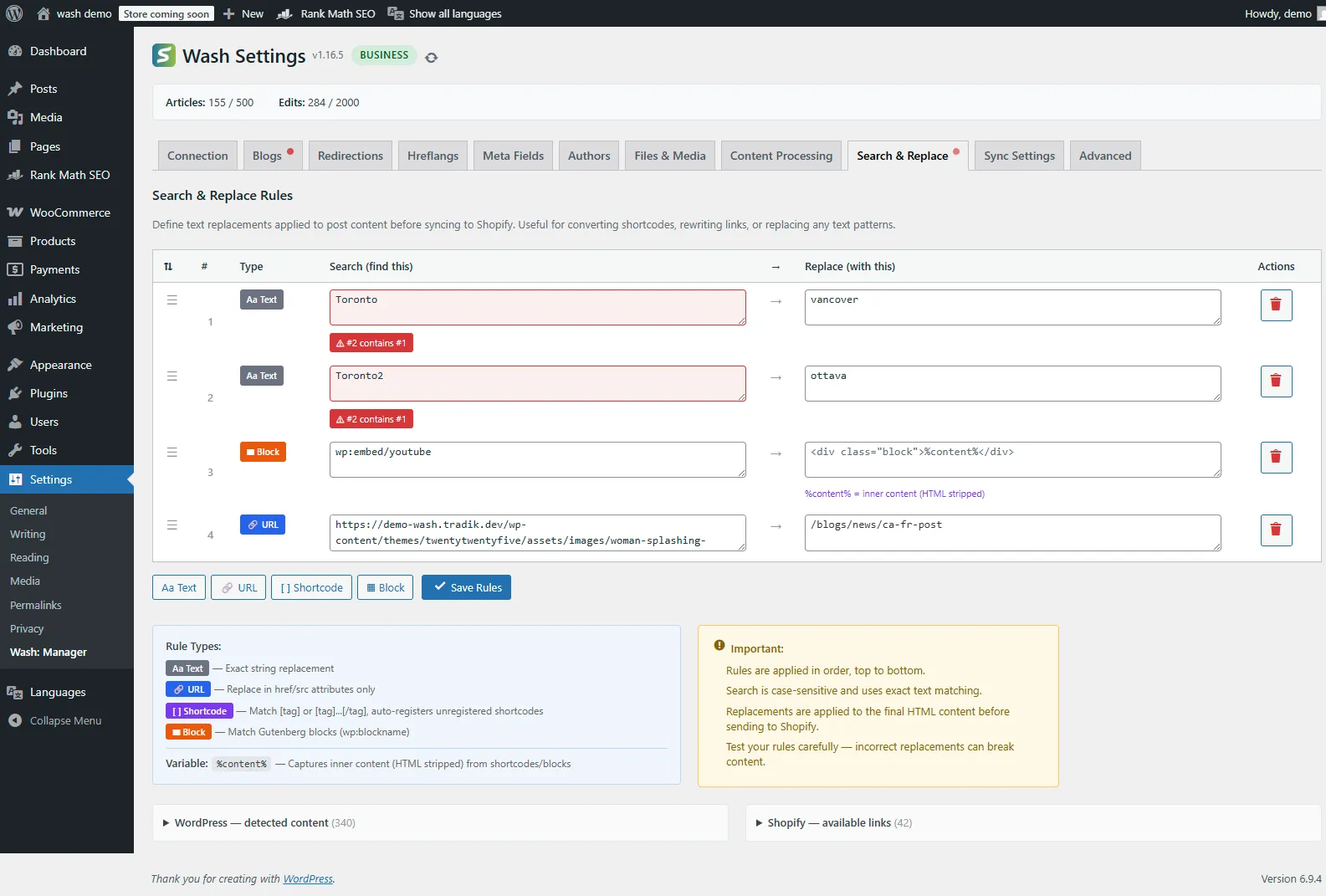
Search & Replace lets you define text transformation rules that are applied to post content before syncing to Shopify. Use it to convert shortcodes, rewrite links, replace text patterns, or transform Gutenberg blocks into Shopify-compatible HTML.
Why Use Search & Replace?
WordPress content often contains elements that don't translate directly to Shopify:
- Internal links pointing to your WordPress domain instead of Shopify
- Shortcodes from plugins that Shopify can't render
- Gutenberg blocks that need conversion to standard HTML
- Text patterns like old brand names or outdated URLs
Search & Replace processes these before the content reaches Shopify, ensuring clean, working HTML on your storefront.
Rule Types
Wash supports four rule types, each optimized for a specific use case:
| Type | Badge | Description |
|---|---|---|
| Text | Aa | Exact string replacement — finds and replaces literal text |
| URL | 🔗 | Replaces in href and src attributes only |
| Shortcode | [ ] | Matches [tag] or [tag]...[/tag] patterns, auto-registers unregistered shortcodes |
| Block | ▦ | Matches Gutenberg blocks (wp:blockname) and their content |
Text Rules
Simple find-and-replace on the final HTML content. Case-sensitive, exact match.
Example — Replace old brand name:
| Search (find this) | Replace (with this) |
|---|---|
Toronto | vancouver |
URL Rules
Targets only href and src attributes in HTML, preventing accidental replacements in visible text.
Example — Rewrite internal links:
| Search (find this) | Replace (with this) |
|---|---|
https://demo-wash.tradik.dev/wp-content/themes/twentytwentyfive/assets/images/ | /blogs/news/a-fr-post |
Shortcode Rules
Matches WordPress shortcodes and converts them to Shopify-compatible HTML. Use %content% to capture the inner content of paired shortcodes.
Example — Convert a newsletter shortcode:
| Search (find this) | Replace (with this) |
|---|---|
[newsletter id="1"] | <div class="form">%content%</div> |
The %content% variable captures inner content (HTML stripped) from the shortcode. For self-closing shortcodes like [newsletter /], %content% resolves to an empty string.
Block Rules
Matches Gutenberg block markup (<!-- wp:blockname -->...<!-- /wp:blockname -->) and replaces it. Also supports %content% for the block's inner HTML.
Example — Convert a custom block:
| Search (find this) | Replace (with this) |
|---|---|
wp:custom/youtube | <div class="video-embed">%content%</div> |
Creating Rules
Step 1: Access Search & Replace
- Go to WordPress Admin > Settings > Wash
- Click the Search & Replace tab
Step 2: Add a Rule
Click one of the type buttons at the bottom of the rules table:
- Aa Text — for plain text replacements
- 🔗 URL — for link/image URL rewrites
- [ ] Shortcode — for shortcode conversions
- ▦ Block — for Gutenberg block transformations
Step 3: Define the Pattern
- Enter the text to find in the Search field
- Enter the replacement in the Replace field
- Leave Replace empty to remove the matched content entirely
Step 4: Save Rules
Click Save Rules to persist your changes. Rules are stored per-connection.
Rule Execution Order
Rules are applied in order, top to bottom. This matters when rules interact:
Rule 1: "Toronto" → "Vancouver"        (applied first)
Rule 2: "Vancouver BC" → "Ottawa ON"   (applied second — but now matches!)
Use drag and drop (grab the ☰ handle) to reorder rules. Higher rules execute first.
Content Suggestions
The Search & Replace tab includes two expandable reference panels at the bottom:
WordPress — Detected Content
Scans your published posts and shows:
- Domains found in your content
- URLs used in links and images
- Shortcodes with usage counts
- Gutenberg blocks (both registered and in-use)
Click any item to copy it to your clipboard for use in a rule.
Shopify — Available Links
Shows available Shopify resources grouped by type:
- Products
- Collections
- Blogs
- Articles
- Pages
Click any link to copy it for use as a replacement target.
Autocomplete
When typing in the Search or Replace fields, Wash provides autocomplete suggestions based on:
- Search field: Suggestions from detected WordPress content (URLs, shortcodes, blocks)
- Replace field: Suggestions from available Shopify links
Start typing at least 2 characters to see matching suggestions.
Overlap Detection
Wash automatically detects when rules overlap or conflict:
- Duplicate rules — Two rules with identical search patterns
- Containment — One rule's search pattern contains another's
Overlapping rules are highlighted in red with a warning badge explaining the conflict. While overlaps are allowed, they may produce unexpected results due to execution order.
Important Notes
- Case-sensitive — Search patterns use exact text matching
- Applied to final HTML — Replacements run on the rendered HTML, not raw WordPress content
- Order matters — Rules execute top-to-bottom; earlier rules can affect later ones
- Test carefully — Incorrect replacements can break content formatting
- Empty replace — Leaving the replacement field empty removes the matched content
Use Cases
Rewriting WordPress URLs to Shopify
Convert internal WordPress links to their Shopify equivalents:
| Type | Search | Replace |
|---|---|---|
| URL | https://yourblog.com/category/news/ | /blogs/news |
| URL | https://yourblog.com/products/ | /collections/all |
Removing Unsupported Shortcodes
Strip plugin shortcodes that have no Shopify equivalent:
| Type | Search | Replace |
|---|---|---|
| Shortcode | [social_share] | (empty) |
| Shortcode | [related_posts limit="3"] | (empty) |
Converting Shortcodes to HTML
Transform shortcodes into styled HTML:
| Type | Search | Replace |
|---|---|---|
| Shortcode | [callout] | <div class="callout-box">%content%</div> |
| Shortcode | [warning] | <div class="alert alert-warning">%content%</div> |
Replacing Gutenberg Blocks
Convert custom blocks to standard HTML:
| Type | Search | Replace |
|---|---|---|
| Block | wp:plugin/cta-block | <div class="cta">%content%</div> |
| Block | wp:embed/tiktok | (empty — removes the block) |
Brand or Domain Migration
Update references after a rebrand or domain change:
| Type | Search | Replace |
|---|---|---|
| Text | OldBrand Inc. | NewBrand Co. |
| URL | https://old-domain.com | https://new-domain.com |
Troubleshooting
Rules Not Applied
- Verify rules are saved (click Save Rules)
- Check that the search text exists in the rendered HTML (not just the WordPress editor)
- Remember matching is case-sensitive
- Ensure the Search & Replace tab is not locked by permissions
Content Broken After Replacement
- Review rules for unintended matches (broad patterns can match too much)
- Check rule order — earlier rules may transform content that later rules expect
- Use the URL type for link replacements to avoid replacing visible text
- Test with a single post before applying to all content
Shortcode Content Not Captured
- Ensure the shortcode uses paired tags:
[tag]content[/tag] - Self-closing shortcodes (
[tag /]) have no inner content %content%captures text only (HTML tags are stripped)
Overlap Warnings
- Overlaps are warnings, not errors — rules still execute
- Reorder rules so more specific patterns come first
- Consider combining overlapping rules into a single rule