Edit in WordPress.
Publish on Shopify.
Write and edit posts in WordPress. Wash publishes them to your Shopify blog with the images, SEO fields and redirects carried across, whether that's a one-off migration or a daily habit.
✓ Free plan includes 5 articles & 20 edits a month. No credit card required.

Everything you need for content sync
Content, images, SEO data and language variants move from WordPress to Shopify when you publish. You don't export or re-upload anything.
Blog & Page Sync
Posts become Shopify blog articles, pages become Shopify pages. Creating, updating and deleting in WordPress all carry over when you publish.
Media CDN Upload
Images and documents uploaded to Shopify CDN via staged uploads. All content URLs automatically rewritten. Optional WebP conversion.
SEO Metadata Sync
Yoast SEO and RankMath data synced as Shopify metafields. Custom hreflang, og:tags, and structured data preserved.
Multisite Support
Each WP Multisite network site maps to a separate Shopify blog. Useful when each language or brand runs as its own site.
Metafield Management
ACF fields, custom fields, and plugin data synced as Shopify metafields. Theme snippets included for display.
HMAC Authentication
All API requests signed with HMAC-SHA256. Replay protection, timestamp validation, and secure key management.
Smart Redirects
Automatically creates 301 redirects from old WordPress URLs to new Shopify paths. Preserves your SEO structure and link equity.
Automated Hreflang
Integrates with WPML, Polylang, TranslatePress & Weglot. Auto-manages hreflang tags between language variants for multilingual SEO.
Document & File Sync
Upload PDFs, Word docs, Excel, PowerPoint, and CSV files to Shopify CDN. All document links automatically rewritten.
WebP Optimization
Automatic image conversion to WebP format for faster loading. Reduces file size by up to 30% without quality loss.
Search & Replace
Define text and URL replacement rules that run during sync. Fix internal links, swap domains, or clean up content automatically.
Gutenberg Blocks
Write in the Gutenberg editor as usual. Native blocks, galleries, columns and embeds arrive on Shopify with their styling.
Three steps to automated sync
Setup takes one sitting. After that, publishing in WordPress is the whole job.
Install Wash from the Shopify App Store
Add the app to your store and pick a plan. The Free plan is enough to try it.
Add the Wash Connector to WordPress
Install the Wash Connector. It runs on your web server, so nothing is installed on your computer.
Connect and Publish
Generate a connect code in Shopify and paste it into WordPress. After that, write in WordPress as usual: every publish, update, or delete is mirrored on your Shopify store.
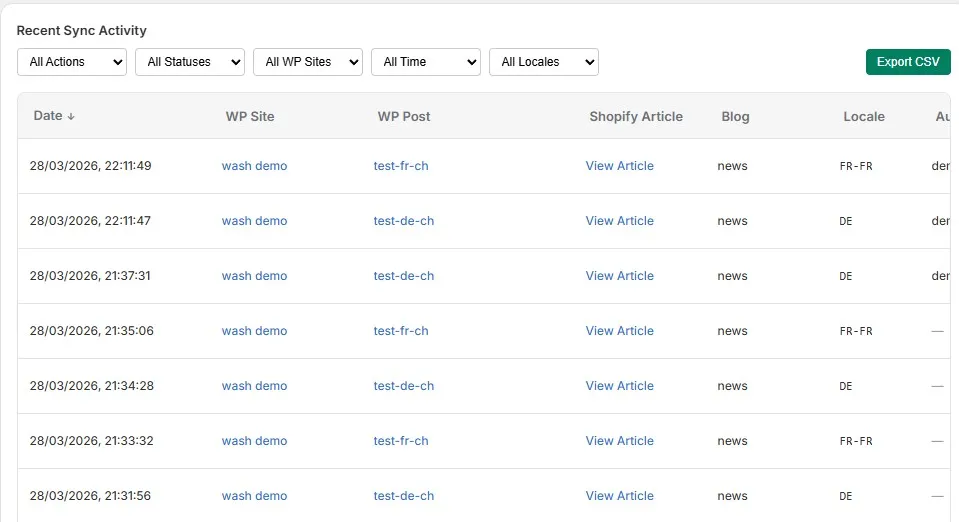
Monitor everything in real time
Track sync status, view detailed logs, and manage your content pipeline from the Shopify admin.
- Content sync progress with per-item status
- Recent activity feed with success/error details
- Multisite blog activity logs
- CSV export logs
Choose your plan
Each plan sets a monthly allowance of new articles and edits. Start on Free and move up when your volume does.
Enough to sync a few real posts and judge the output.
No credit card required
What's included
- ✓ 5 new articles per month
- ✓ 20 edits per month
- ✓ 1 WordPress connection
- ✓ Basic image CDN sync
- ✓ Page sync
- ✓ Community support
Adds SEO, metafield and multi-language sync.
Billed monthly · Cancel anytime
Everything in Free, plus
- ✓ 100 new articles per month
- ✓ 500 edits per month
- ✓ 5 WordPress connections
- ✓ SEO sync (Yoast / RankMath)
- ✓ Metafield management
- ✓ Hreflang multi-language support
- ✓ Author mapping
- ✓ Blog mapping by language/category
- ✓ Email support
Adds 301 redirects, ACF sync and search-and-replace rules.
Billed monthly · Cancel anytime
Everything in Pro, plus
- ✓ 500 new articles per month
- ✓ 2,000 edits per month
- ✓ 10 WordPress connections
- ✓ Smart redirections (301)
- ✓ ACF sync (Advanced Custom Fields)
- ✓ Search & Replace rules
For publishers syncing a thousand or more articles a month.
Billed monthly · Cancel anytime
Everything in Business, plus
- ✓ 1,000+ new articles per month
- ✓2,500+ edits per month
- ✓ 20 WordPress connections
- ✓ All features included
- ✓ Priority support
Feature comparison
| Feature | Free | Pro | Business | Enterprise |
|---|---|---|---|---|
| Monthly Articles | 5 | 100 | 500 | 1,000 |
| Monthly Edits | 20 | 500 | 2,000 | Unlimited |
| WordPress Connections | 1 | 5 | 10 | 20 |
| Basic Article Sync | ✓ | ✓ | ✓ | ✓ |
| Image CDN Sync | ✓ | ✓ | ✓ | ✓ |
| Page Sync | ✓ | ✓ | ✓ | ✓ |
| SEO Sync (Yoast/RankMath) | — | ✓ | ✓ | ✓ |
| Metafield Management | — | ✓ | ✓ | ✓ |
| Hreflang Multi-language | — | ✓ | ✓ | ✓ |
| Author Mapping | — | ✓ | ✓ | ✓ |
| Blog Mapping | — | ✓ | ✓ | ✓ |
| Smart Redirections (301) | — | — | ✓ | ✓ |
| ACF Sync | — | — | ✓ | ✓ |
| Search & Replace | — | — | ✓ | ✓ |
| Priority Support | — | — | — | ✓ |
Frequently asked questions
What people usually ask before they install.
Wash: Blog Manager only creates and manages content that is synced from WordPress. Your existing Shopify blog articles, pages, and products remain untouched. Each synced item is tracked by its WordPress ID, so there's no conflict.
Yes. By default, Wash: Blog Manager syncs post and page types. You can add any custom post type in the plugin settings. Custom types are synced as Blog Articles on Shopify.
Ready to sync your content?
The free plan covers 5 articles and 20 edits a month. Upgrade when you need more.